Monday, 23 November 2015

Memory check 3


1)What does the acronym DSLR stand for? Describe the difference between a bridge camera

The lens on a bridge camera cannot be removed. This is not a major problem as they often have a 10x to 20x zoom lens. A DSLR is a Digital SLR, meaning it has a digital sensor to record images. 

2) Name four genres of photography where a zoom lens is used.

Wide shot, extreme wide shot, mid shot, Close-up, Extreme close-up

3) The key light is the name given to the main source of light we are using during a photo shoot. Name four sources of light you could use to produce this light on future assignments.

Natural light, Red head light, Torch light, Lamp light, candle light , studio light

4) what does the term ‘considered’ mean when referred to your final shots?


Taking to account

Monday, 16 November 2015

memory check 2

1. ISO is increased as the light level becomes less. What ISO number would be used on a bright sunny day and what ISO would be used when shooting in low light?

In low light you will need high ISO (800) in high light it will be low ISO (100)
2. There are many types of camera lens, for example macro. List three other types of lens.

Standard lens, wide angle , prime lens,

3. What do the following three camera mode acronym stand for? M, S, P, A

Manual, shutterspeed, program and aperture

4. Detail three skills you have used/evidenced during this assignment that could be used on your CV. Meeting deadlines, Following instructions, Working in a group, 

5. List three props that could be used to make a Film Noir
photoshoot look authentic.

Formal suit, Hat, steam machine, cigarette 

4 of 4 final images


To recreate this image I had to go to the train station in Central Nottingham and take a portrait shot of the train track I had to get onto a platform and take the image of the long track.

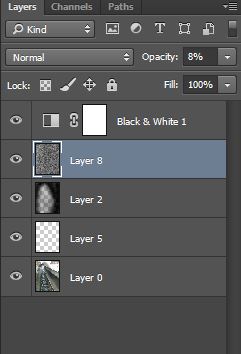
When editing I went onto the Photoshop software and firstly I opened the image up onto it and then I made a new layer which I used the brush tool to darken the selected areas which is mostly the sides I did this by changing the brush size to around 700 and changed the opacity to 65% furthermore to get the lighter areas so it faded in i changed the brush size to 500 and changed the opacity to 17% Furthermore I made another layer And I copied and pasted a 'Grain texture image'' from the internet and I changed the opacity of the image to 8% so the fade has more of an effect and it looks retro. Furthermore On another layer I then used the dodge tool to brighten the end of the track up and make it lighter just like the Image i'm recreating.